1. Overview
The worksheet table toolbar is the first line displayed in the worksheet window. It provides quick access to reference navigation, cell type information, automatic calculations, cell comments, and AutoScroll range management.
2. Toolbar Components
- Reference Navigation — Clicking the first toolbar section (showing the current reference) jumps back to that location if you previously scrolled away using scrollbars.
-
Cell Type Information
— The second section displays:
- the current cell type (for a single‑cell selection)
- counts of cell types (for multi‑cell selections)
-
Automatic Calculations
— The third section displays several calculation results computed automatically for the selected range.
Clicking this section opens the Options dialog box, where you can choose:
- which functions to display
- other table toolbar options
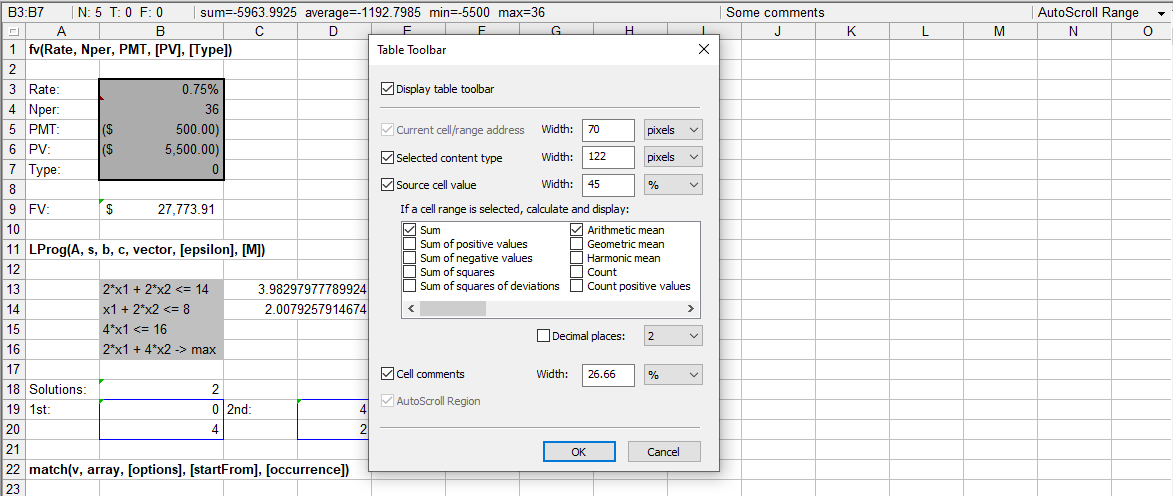
Calculations run in the background each time you complete a selection (e.g., releasing the mouse button or the Shift key). During calculation, displayed values are temporarily grayed out.
- Cell Comments — The fourth section displays comments for the current cell. Click it to add or edit a comment.
-
AutoScroll Range Indicator
— The fifth section shows whether an AutoScroll range is active.
Click it to:
- create a new AutoScroll range
- jump to and select an existing range
- deactivate the current AutoScroll range