1. Selecting a Range of Cells
Do one of the following:
- Use the mouse cursor.
- Press Shift and use any scrolling keys or shortcuts.
-
Enter a cell or range in the Location field on the toolbar, then click the “Enter” button or press Enter.
You can bookmark any location. Click the “*” button to add a bookmark. Use the “<*” and “*>” toolbar buttons to jump between bookmarks, or manage them via View > Bookmarks. - Press Ctrl+Space to select the entire current column.
- Press Shift+Space to select the entire current row.
2. Workbook Window Navigation Shortcuts
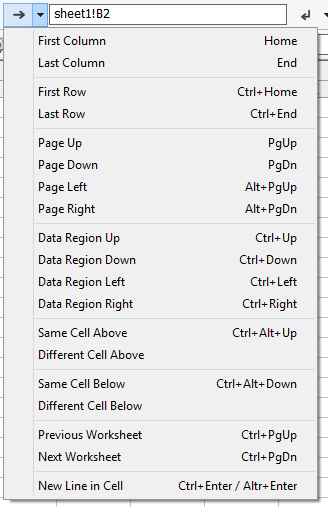
3. Print Preview Navigation Shortcuts
Use the standard cursor keys: Up, Down, Left, Right, PgUp, PgDn, PgUp+Alt, PgDn+Alt.
Ctrl+PgUp and Ctrl+PgDn jump to the previous or next preview page.
4. Other Shortcuts
| Ctrl+B | Bold font |
| Ctrl+I | Italic font |
| Ctrl+U | Underline font |
| Ctrl+T | Strikeout font |
| F6 |
Next pane in the following order: 1. Worksheet tree (if visible) 2. Worksheet window 3. Inspect Cells (if visible) |
| Ctrl+F6 | Open/close the worksheet tree pane |
5. Jumping to a Cell or Range
- Use the Location field as described above.
6. Auto‑Scroll
Click inside the worksheet window using the mouse wheel button. Move the mouse to choose scrolling speed and direction relative to the clicked point.